In this () tutorial, we are going to compute the intersection between a line and a sphere, and visualize using VTK.
More examples and tutorials can be found here
Line-Sphere Intersection
We previously discussed how to compute the intersection between a line and a sphere. Here, we are going visualize this process.
Python Setup
import math
import numpy as np

# First access the VTK module (and any other needed modules) by importing them.
# noinspection PyUnresolvedReferences
import vtkmodules.vtkRenderingOpenGL2
from vtkmodules.vtkCommonColor import vtkNamedColors
from vtkmodules.vtkCommonTransforms import vtkTransform
from vtkmodules.vtkFiltersSources import vtkSphereSource
from vtkmodules.vtkFiltersSources import vtkLineSource
from vtkmodules.vtkFiltersCore import vtkTubeFilter
from vtkmodules.vtkInteractionStyle import vtkInteractorStyleTrackballCamera
from vtkmodules.vtkInteractionWidgets import vtkBoxWidget
from vtkmodules.vtkRenderingCore import (
    vtkActor,
    vtkPolyDataMapper,
    vtkRenderWindow,
    vtkRenderWindowInteractor,
    vtkRenderer
)Geometry
For this example, assume the sphere is located at the origin and has a radius of 5. Feel free to change the geometry of the sphere by changing the center and the radius.
colors = vtkNamedColors()

sphere = vtkSphereSource()
sphereCentre = np.array([ 0, 0, 0 ])
sphereRadius = 5.0
sphere.SetCenter( sphereCentre.tolist() )
sphere.SetRadius( sphereRadius )
sphere.SetPhiResolution( 20 )
sphere.SetThetaResolution( 20 )

sphereMapper = vtkPolyDataMapper()
sphereMapper.SetInputConnection( sphere.GetOutputPort() )

sphereActor = vtkActor()
sphereActor.SetMapper( sphereMapper )
sphereActor.GetProperty().SetColor( colors.GetColor3d('Bisque') )
A line segment is specified by its 2 end points. Feel free to change these locations.
Note that for our numerical solution, we need to compute the direction (orientation) of the line, which is represented as a unit vector.
line = vtkLineSource()
point1 = np.array([ 10, 0, 0])
point2 = np.array([-10, 0, 0])
v = point2 - point1
v = v/np.linalg.norm( v )

line.SetPoint1( point1.tolist() )
line.SetPoint2( point2.tolist() )

tube = vtkTubeFilter()
tube.SetInputConnection( line.GetOutputPort() )
tube.SetRadius( 0.1 )
tube.SetNumberOfSides(10)

lineMapper = vtkPolyDataMapper()
lineMapper.SetInputConnection( tube.GetOutputPort() )

lineActor = vtkActor()
lineActor.SetMapper( lineMapper )
The quadratic equation that allows us to solve for the intersection. Since this is a quadratic equation, if the term inside the square-root (i.e. determinant) is:
positive, there are 2 solutions (i.e. 2 intersections),
zero, there is exactly 1 solution (i.e. the line is tangent to the sphere), or
negative, there are 0 solution (i.e. there is no intersection)
## calculate the intersection
PC = point1 - sphereCentre
determinant = np.dot(v, PC) * np.dot(v, PC) - np.dot(PC,PC) + sphereRadius * sphereRadius

if determinant > 0:                     # 2 intersections
    a = -1 * np.dot( v, PC)
    t1 = a + math.sqrt( determinant )
    L1 = point1 + t1 * v
    t2 = a - math.sqrt( determinant )
    L2 = point1 + t2 * v
elif determinant == 0:                  # 1 intersection
    a = -1 * np.dot(v, PC)
    L1 = point1 + a * v
In terms of visualization, we need to either 1 or 2 (or 0) actors to the scene, depending on what this determinant is:
if determinant > 0:                         # 2 intersections
    s1 = vtkSphereSource()
    s1.SetCenter( L1.tolist() )
    s1.SetRadius( 0.4 )

    s1Mapper = vtkPolyDataMapper()
    s1Mapper.SetInputConnection( s1.GetOutputPort())

    s1Actor = vtkActor()
    s1Actor.SetMapper( s1Mapper )
    s1Actor.GetProperty().SetColor( colors.GetColor3d('Red'))

    s2 = vtkSphereSource()
    s2.SetCenter( L2.tolist() )
    s2.SetRadius( 0.4 )

    s2Mapper = vtkPolyDataMapper()
    s2Mapper.SetInputConnection( s2.GetOutputPort())

    s2Actor = vtkActor()
    s2Actor.SetMapper( s2Mapper )
    s2Actor.GetProperty().SetColor( colors.GetColor3d('Red'))
elif determinant == 0:                      # 1 intersection
    s1 = vtkSphereSource()
    s1.SetCenter( L1.tolist() )
    s1.SetRadius( 0.4 )

    s1Mapper = vtkPolyDataMapper()
    s1Mapper.SetInputConnection( s1.GetOutputPort())

    s1Actor = vtkActor()
    s1Actor.SetMapper( s1Mapper )

# if the determinant is 0, there is no intersection
#
# do NOTHING
Rendering
ren = vtkRenderer()
ren.AddActor( sphereActor )
ren.AddActor( lineActor )

if determinant > 0:
    ren.AddActor( s1Actor )
    ren.AddActor( s2Actor )
elif determinant == 0:
    ren.AddActor( s1Actor )

ren.SetBackground( colors.GetColor3d('MidnightBlue'))

renWin = vtkRenderWindow()
renWin.AddRenderer(ren)
renWin.SetSize(640, 480)
renWin.SetWindowName('AISE 4025, Intersection between a line and a sphere')

iren = vtkRenderWindowInteractor()
iren.SetRenderWindow(renWin)
Rendering and user interaction:
iren.Initialize()
iren.Start()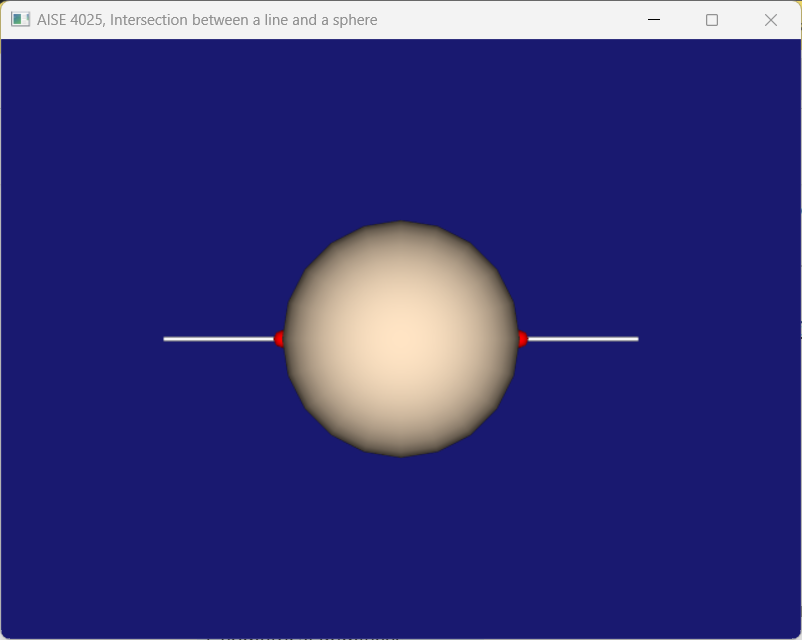
Figure 1:Intersection between a line and a sphere.