In this (sixth) tutorial, we are going to compute the intersection between a line and a plane in 3D, and visualize using VTK.
More examples and tutorials can be found here
Line-Plane Intersection
We previously discussed how to compute the intersection between a line and a plane. Here, we are going visualize this process.
Python Setup
import math
import numpy as np

# noinspection PyUnresolvedReferences
import vtkmodules.vtkInteractionStyle
# noinspection PyUnresolvedReferences
import vtkmodules.vtkRenderingOpenGL2
from vtkmodules.vtkCommonColor import vtkNamedColors
from vtkmodules.vtkCommonTransforms import vtkTransform
from vtkmodules.vtkFiltersSources import vtkLineSource
from vtkmodules.vtkFiltersSources import vtkPlaneSource
from vtkmodules.vtkFiltersSources import vtkSphereSource
from vtkmodules.vtkFiltersCore import vtkTubeFilter
from vtkmodules.vtkRenderingAnnotation import vtkAxesActor
from vtkmodules.vtkRenderingCore import (
    vtkActor,
    vtkPolyDataMapper,
    vtkRenderWindow,
    vtkRenderWindowInteractor,
    vtkRenderer
)
The Rendering Pipeline
# Visualization Pipeline

# a renderer and render window
ren = vtkRenderer()
renWin = vtkRenderWindow()
renWin.SetWindowName('AISE 4025: Orthonormal Basis')
renWin.SetSize( 640, 480 )
renWin.AddRenderer( ren )

# an interactor
iren = vtkRenderWindowInteractor()
iren.SetRenderWindow( renWin )

colors = vtkNamedColors()Geometry
A line is specified by
a fixed point on the line, and
a unit vector specifying the orientation of the line
# geometry of the line L = P + v t
P =  np.array([ 7, 1, -20 ])
v =  np.array([ 1, 1, 0 ])

## make sure the direction is a unit vector
v = v/np.linalg.norm(v)
A plane is specified by
a fixed on the plane, and
a unit vector specifying the normal of the plane
# 3 points on a plane
A =  np.array([ 5, 7, 0 ])
B = A + (-40) * np.array( [0, 1, 0] )
C = A + (-40) * np.array( [0, 0, 1] )\

n = np.cross( B-A, C-A )

# make sure the normal of the plane is normalized
n = n/np.linalg.norm(n)

print(n)
The line parameter for a point on the line that is also on the plane is:
t = np.dot( (A-P), n ) / np.dot( v, n )

L = P + v * t
print( L )Rendering
vtkPlaneSource can be used:
# source
planeSource = vtkPlaneSource()
planeSource.SetCenter( A.tolist() )
# planeSource.SetNormal( n.tolist() )
planeSource.SetPoint1( B.tolist() )
planeSource.SetPoint2( C.tolist() )

# mapper
planeMapper = vtkPolyDataMapper()
planeMapper.SetInputConnection( planeSource.GetOutputPort() )

# actor
planeActor = vtkActor()
planeActor.SetMapper( planeMapper )
Rendering of a line, we use vtkLineSource:
# source
lineSource = vtkLineSource()
lineSource.SetPoint1( P.tolist() )
lineSource.SetPoint2( (P + 2 * t *v).tolist() )

tube = vtkTubeFilter()
tube.SetInputConnection( lineSource.GetOutputPort() )
tube.SetRadius( 0.3 )

# mapper
lineMapper = vtkPolyDataMapper()
lineMapper.SetInputConnection( tube.GetOutputPort() )

# actor
lineActor = vtkActor()
lineActor.SetMapper( lineMapper )
lineActor.GetProperty().SetColor( colors.GetColor3d( 'Red') )
Render the intersection between the line and plane using a sphere
# source
sphereSource = vtkSphereSource()
sphereSource.SetCenter( L.tolist() )
sphereSource.SetRadius( 0.4 )

# mapper
sphereMapper = vtkPolyDataMapper()
sphereMapper.SetInputConnection( sphereSource.GetOutputPort() )

# actor
sphereActor = vtkActor()
sphereActor.SetMapper( sphereMapper )
sphereActor.GetProperty().SetColor( colors.GetColor3d( 'Yellow' ) )
Add an axes
Add an x-y-z-axes to help us orient.
# add an 3D Axes
axes = vtkAxesActor()
axes.SetTotalLength( 10, 10, 10 )
axes.AxisLabelsOff()

# properties of the axes labels can be set as follows
# this sets the x axis label to red
axes.GetXAxisCaptionActor2D().GetCaptionTextProperty().SetColor(colors.GetColor3d('Red'));
axes.GetYAxisCaptionActor2D().GetCaptionTextProperty().SetColor(colors.GetColor3d('Green'));
axes.GetZAxisCaptionActor2D().GetCaptionTextProperty().SetColor(colors.GetColor3d('Blue'));
Add all actors into the render window
ren = vtkRenderer()
ren.AddActor( planeActor )
ren.AddActor( lineActor )
ren.AddActor( sphereActor )
ren.AddActor( axes )
ren.SetBackground( colors.GetColor3d('MidnightBlue'))
ren.SetBackground( 1, 1, 1 )

renWin = vtkRenderWindow()
renWin.AddRenderer(ren)
renWin.SetSize(640, 480)
renWin.SetWindowName('AISE 4025, Line-Plane Intersection')

iren = vtkRenderWindowInteractor()
iren.SetRenderWindow(renWin)
Draw to the renderer and start the user interaction
renWin.Render()
iren.Start()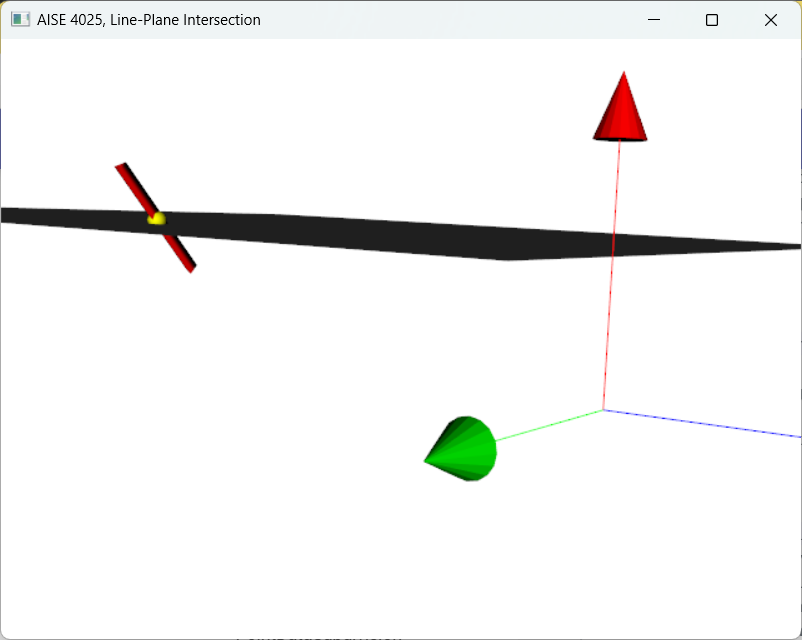
Figure 1:Intersection between a line (red) and a plane (gray) is shown as a sphere (yellow).