In this (fifth) tutorial, we are going to compute the area of a triangle ourselves, as well using external function(s) provided by VTK.
More examples and tutorials can be found here
Area of a triangle
An triangle is specified by each of its 3 vertices, , , and . Conceptually, the area of a triangle is half of a parallelogram with the same base and height.
We previously shown that the area of a triangle can be computed using the cross product. Here, we are going visualize this process.
Python Setup
import math
import numpy as np

# noinspection PyUnresolvedReferences
import vtkmodules.vtkInteractionStyle
# noinspection PyUnresolvedReferences
import vtkmodules.vtkRenderingOpenGL2
from vtkmodules.vtkCommonColor import vtkNamedColors
from vtkmodules.vtkCommonTransforms import vtkTransform
from vtkmodules.vtkCommonCore import vtkPoints
from vtkmodules.vtkRenderingAnnotation import vtkAxesActor
from vtkmodules.vtkCommonDataModel import (
    vtkCellArray,
    vtkPolyData,
    vtkTriangle
)
from vtkmodules.vtkRenderingCore import (
    vtkActor,
    vtkPolyDataMapper,
    vtkRenderWindow,
    vtkRenderWindowInteractor,
    vtkRenderer
)
The Rendering Pipeline
# Visualization Pipeline

# a renderer and render window
ren = vtkRenderer()
renWin = vtkRenderWindow()
renWin.SetWindowName('AISE 4025: Orthonormal Basis')
renWin.SetSize( 640, 480 )
renWin.AddRenderer( ren )

# an interactor
iren = vtkRenderWindowInteractor()
iren.SetRenderWindow( renWin )

colors = vtkNamedColors()Geometry
Given 3 points , , and ,
compute one of the triangle serving as the base of a triangle,
compute the second side of the triangle
# 3 vertices of a triangle
a =  np.array([ 1, 1, 0 ])
b =  np.array([ 7, 1, 0 ])
c =  np.array([ 7, 4, 0 ])

# one side of the triangle
AB = b-a
AC = c-a

Area = 0.5 * np.linalg.norm( np.cross( AB, AC) )
print("Area computed by ourselves is: ", Area)
print("Area computed using VTK is: ", vtkTriangle().TriangleArea( a.tolist(), b.tolist(), c.tolist() ) )Geometry
We can use vtkTriangle as the geometrical primitive in VTK. The following example shows that we can define any geometrical shapes (if needed), using triangles.
# create a triangle
points = vtkPoints()
points.InsertNextPoint( a.tolist() )
points.InsertNextPoint( b.tolist() )
points.InsertNextPoint( c.tolist() )

triangle = vtkTriangle()
triangle.GetPointIds().SetId( 0, 0 )
triangle.GetPointIds().SetId( 1, 1 )
triangle.GetPointIds().SetId( 2, 2 )

triangles = vtkCellArray()
triangles.InsertNextCell( triangle )

# Create a POlydata object
trianglePolyData = vtkPolyData()

# Add the geometry and topology to the polydata
trianglePolyData.SetPoints( points )
trianglePolyData.SetPolys( triangles )

# mapper and actor
triangleMapper = vtkPolyDataMapper()
triangleMapper.SetInputData( trianglePolyData )

triangleActor = vtkActor()
triangleActor.SetMapper( triangleMapper )
triangleActor.GetProperty().SetColor( colors.GetColor3d( 'Red' ) )
Add an axes
Add an x-y-z-axes to help us orient.
# add an 3D Axes
axes = vtkAxesActor()
axes.SetTotalLength( 10, 10, 10 )
axes.AxisLabelsOff()

# properties of the axes labels can be set as follows
# this sets the x axis label to red
axes.GetXAxisCaptionActor2D().GetCaptionTextProperty().SetColor(colors.GetColor3d('Red'));
axes.GetYAxisCaptionActor2D().GetCaptionTextProperty().SetColor(colors.GetColor3d('Green'));
axes.GetZAxisCaptionActor2D().GetCaptionTextProperty().SetColor(colors.GetColor3d('Blue'));
Add all actors into the render window
ren = vtkRenderer()
ren.AddActor( triangleActor )
ren.AddActor( axes )
ren.SetBackground( colors.GetColor3d('MidnightBlue'))
ren.SetBackground( 1, 1, 1 )

renWin = vtkRenderWindow()
renWin.AddRenderer(ren)
renWin.SetSize(640, 480)
renWin.SetWindowName('AISE 4025, Orthonormal Basis')

iren = vtkRenderWindowInteractor()
iren.SetRenderWindow(renWin)
Draw to the renderer and start the user interaction
renWin.Render()
iren.Start()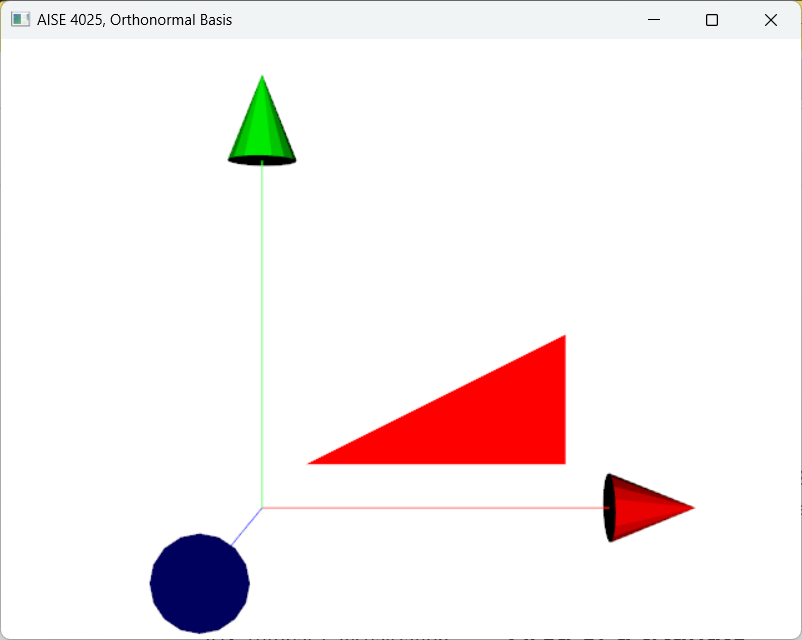
Figure 1:A triangle is uniquely specified by 3 points (vertices) as long as they are not co-linear.